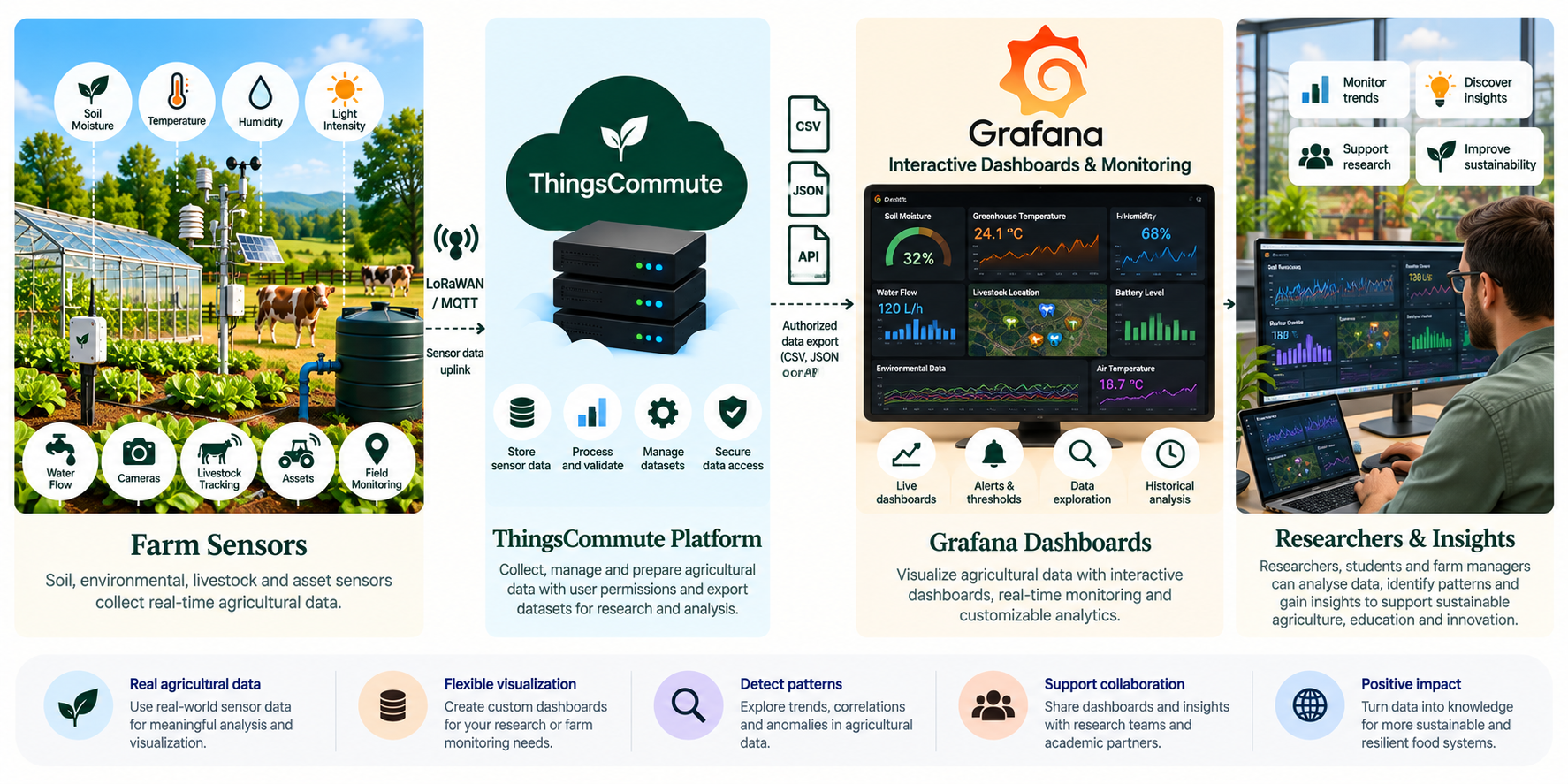
Transforming agricultural sensor data into interactive dashboards and actionable insights.
ThingsCommute already provides operational dashboards for farmers. Grafana would be an optional advanced visualization environment for researchers, students and farm managers who want customizable charts, historical comparisons and additional monitoring capabilities.
Potential applications include soil moisture trends, greenhouse temperature, environmental conditions, water usage and livestock telemetry. Any connected views would depend on an approved data source and future implementation.
Illustrative future integration. Grafana data connections, real-time streaming and automatic synchronization are not currently provided as ThingsCommute services.
Optional advanced visualization
Explore patterns across agricultural data.
Grafana is primarily a visualization and monitoring platform. It does not replace ThingsCommute’s device management or operational controls.
H
Historical comparisons
Compare soil moisture trends across fields or time periods.
Review greenhouse temperature and other environmental conditions.
Explore water usage and livestock telemetry alongside other observations.
I
Custom monitoring views
Build charts and panels suited to research or farm-management questions.
Compare historical readings where suitable data is available.
Consider configurable alerts only where the data source and setup support them.
Two possible approaches
Choose a future visualization workflow.
Both options are planned and marked Coming Soon. Select a card to learn about the proposed requirements and steps.
These options are not operational. No Grafana connections, credentials, dashboards, real-time streams or automatic synchronization are implemented on this website.
Before setting up a visualization environment
Requirements to plan for.
A ThingsCommute account with access to the relevant datasets.
Grafana OSS, Grafana Cloud or an institution-managed Grafana instance.
A compatible data source, such as PostgreSQL, InfluxDB or another supported system.
Appropriate credentials and permissions for the selected data and Grafana setup.
Hosting, storage or managed-service resources, which may involve costs.
Grafana’s data access and sharing behavior depends on configuration and permissions. Private sensor data does not become public automatically.
01
Data export · Coming Soon
Export Data for Grafana
A proposed file-based approach for researchers and advanced users who want to explore permitted agricultural datasets in their own Grafana environment.
Planned steps
Access or export an agricultural dataset the user is permitted to use.
Prepare the data in a Grafana-compatible data source.
Build custom dashboards and historical visualizations in Grafana.
Share charts only according to the data owner’s permissions.
Suitable for
Research and advanced analysis.
Users with access to their own Grafana environment and compatible data source.
Historical comparisons using data that is available and authorized for use.
02
Connected dashboards · Coming Soon
Connected Monitoring Dashboards
A planned integration with an authorized Grafana-compatible data source. Near-real-time visualization may be possible where the data source and configuration support it; no streaming or automatic synchronization is promised.
Potential capabilities
Custom charts, monitoring panels and configurable alerts.
Data access governed by ThingsCommute permissions and Grafana configuration.
Near-real-time views only where the authorized data source supports them.
Before it can be offered
Agree which datasets are permitted for the intended dashboard users.
Review the compatible data source, credentials and access permissions.
Confirm refresh behavior and monitoring limits for the chosen setup.